File Storage
File Structures
Another member of the team should be able to pick up work where you left off and easily find files. Consistent folder, file structures and naming conventions will ensure this is possible.
Where does a file live?
Google Drive
- All project and agency files live in Google Shared Drives, not My Drive
- This includes Briefs, Material Instructions, Media Matrix', WIPs and Google Docs
- Only private documents live on your My Drive
Figma
- All Figma design files live in Figma
- Placed assets (images, fonts, exports) still live within the relevant project folder on Google Drive
Client Folder Structure
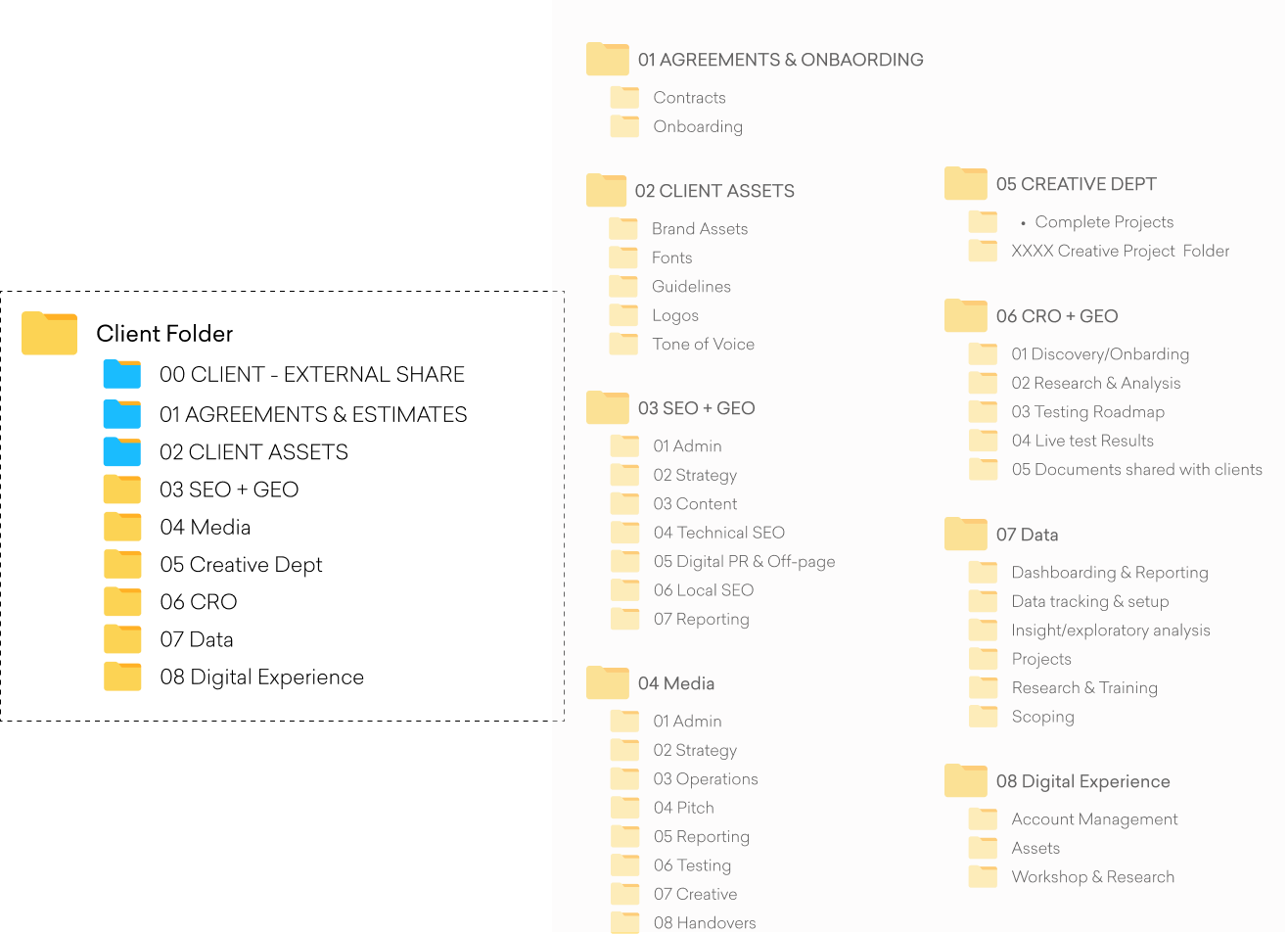
To ensure consistency and ease of access, we follow a standard folder structure for all clients, both new and existing.
As illustrated to the right, the top level contains folders for each Jaywing department, along with central folders for shared assets and admin resources.
Each department folder is owned and managed by the relevant department lead for that specific client. All files must be saved in the appropriate subfolder and regularly maintained to keep the structure organised and easy to navigate.
Client Folder Template.zip
Shared Drive: Jaywing Internal
Note: 00 CLIENT, EXTERNAL SHARE is a folder that we use to share files with clients. Please don't share any of the other folders. Individual files are exempt from this process.
Creative Folder Structure
We follow a standard folder structure for all creative projects. This ensures consistency and makes it easy to find what you need.
File management: Save our creative project template folder to your desktop. For each new project within your browser select 'folder upload' within the 'Creative Dept' client folder and locate this template on your desktop to upload. Rename accordingly.
Otherwise if you run local gDrive you can copy to your folder on your Mac.
Folder structure: The illustration to the right shows our folder structure and explains what each folder is used for.
Creative Project Folder Template
Shared Drive/Jaywing/02 CLIENTS

File Naming
Creative & General Files
Including the project number in our file name helps others to quickly locate files on the server.
Version control is the most important part of naming our files. Be sure to save a new version of a file BEFORE working on it, especially if there's going to be significant changes.
Client Round Versions: v1, v2, v3, each new round sent to the client increments the major version number.
Internal Round Versions: v1.1, v1.2, minor revisions within the same client round use a decimal.
Creative Brief Examples
- 12345 QUT Real Degree Poster Brief_v1 (i.e. Round 1)
- 12345 QUT Real Degree Poster DeBrief_v2 (ie Round 2)
- 12345 QUT Real Degree Poster DeBrief_v3 (ie Round 3)
While we should try to use this file naming where possible, you may need to add in extra information to make things easier to manage, especially on larger more complex projects. Remember, if another member of the team can pick up work where you left off, you're doing it right!
SPECIAL CHARACTERS should be avoided. E.g. " * : < > ? / | \